Feed in the concept
A full-body character render or polished concept painting, front view preferred.
Concept art to first 3D draft used to take days of sculpting. Image-to-3D gives you a textured base mesh in about a minute — not final game topology, but a solid starting point for retopo, sculpting or lookdev. This page shows a real armored-character conversion and what to expect from the topology.
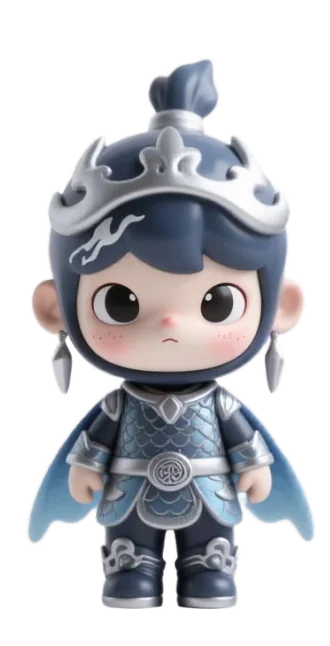
A full-body character render or polished concept painting, front view preferred.
~500K triangle mesh with PBR textures — dense, triangulated scan-style topology.
Check proportions and silhouette from all angles before pulling it into your DCC.
Decimate or retopologize in Blender/ZBrush for animation; use as-is for background props and lookdev.
GLB drops straight into Blender, Unity and Unreal with textures connected. For sculpting workflows, import the GLB into ZBrush via GoZ or convert to OBJ in Blender first.
As a background prop or lookdev asset, often yes after decimation. As an animated hero character, no — you would retopologize it, which is still far faster than starting from nothing.
As solid sculpted shapes with fur detail in the textures — the same approach collectible figurines use. Strand-based hair is not generated.
The current pipeline uses a single image. Choose the most informative view — usually a front A-pose with the full silhouette visible.
Three 2048×2048 maps (base color, metallic-roughness, normal) embedded in the GLB, ready for PBR rendering.